
Why Is My Modbus Value Wrong?
A common Modbus fault looks deceptively healthy: the request is valid, the device replies and the CRC is correct, but the value shown in the PLC, BMS or commissioning tool is wrong.
That usually means the communication layer is working and the problem is in the interpretation of the returned registers. The same 16 or 32 bits can represent very different values depending on the register address, data type, signedness, word order, scaling and unit.
A useful rule is:
Valid Modbus frame != correct engineering value
Start with the raw response
Before changing scaling in the BMS, write down what the device actually returned. If possible, decode the frame and record the raw 16-bit register values.
For example:
Register value = 0xFF9C
Do not start by asking whether 65436 looks reasonable. First ask what the register map says this 16-bit pattern represents.
You can use the online Modbus decoder to inspect a captured request or response.
Check the address and register type first
A perfect data conversion applied to the wrong register still gives the wrong result.
Confirm:
- the protocol address being requested
- whether the documentation uses zero-based, one-based or 4xxxx-style numbering
- the correct data model: Coil, Discrete Input, Input Register or Holding Register
- the function code
- the number of consecutive registers required by the value
Reading address 10 with Function Code 03 is not the same request as reading address 10 with Function Code 04. Likewise, a manual that shows 40001 may refer to protocol offset 0, not to a request address of forty thousand and one.
For the numbering problem, see Modbus Addressing: 40001, 0-Based and 1-Based.
One register does not define its own data type
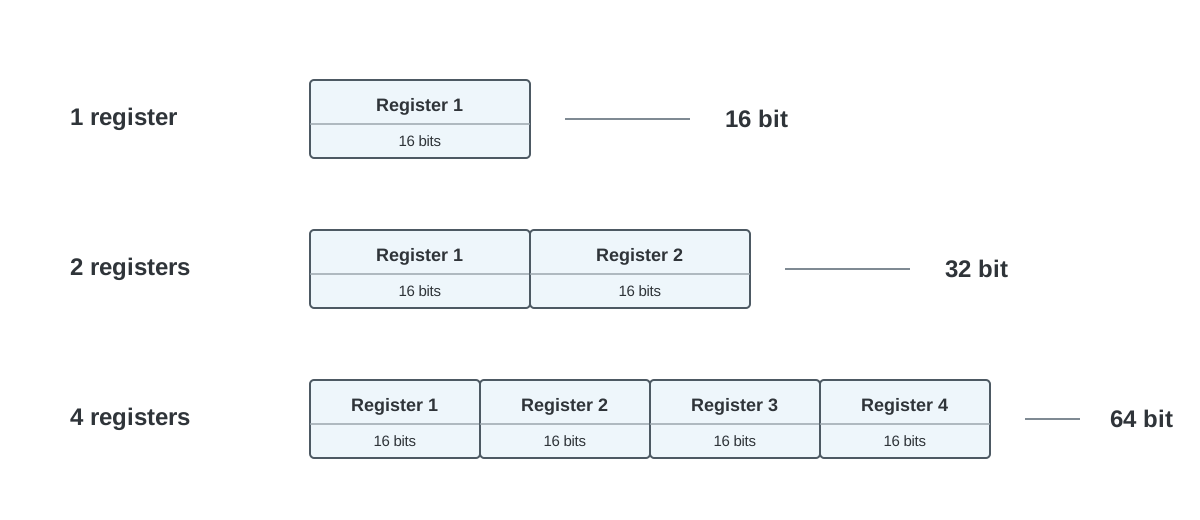
A Modbus register carries 16 bits. The protocol does not tell the client whether those bits are an unsigned integer, signed integer, bit field or half of a larger value.
Common representations are:
| Data type | Size | Registers |
|---|---|---|
UINT16 | 16 bits | 1 |
INT16 | 16 bits | 1 |
UINT32 | 32 bits | 2 |
INT32 | 32 bits | 2 |
FLOAT32 | 32 bits | 2 |
UINT64 / INT64 | 64 bits | 4 |
FLOAT64 | 64 bits | 4 |
The register map must define the representation. If it only says “temperature” or “32-bit value”, the interface is incomplete.
Signed and unsigned interpretation
Consider the same raw 16-bit register:
0xFF9C
| Interpretation | Value |
|---|---|
UINT16 | 65436 |
INT16 | -100 |
If the register is an INT16 temperature with scale x0.1 °C, the engineering value is:
-100 x 0.1 = -10.0 °C
The communication is not broken. The same bits were simply interpreted as the wrong numeric type.
Signedness matters whenever the real quantity can be negative, for example outdoor temperature, differential pressure, calibration offset or a control correction.
32-bit values need two decisions: type and register order
A 32-bit value uses two 16-bit registers. Suppose the device returns:
Register 1 = 0x42F6
Register 2 = 0x0000
The bytes are:
42 F6 00 00
With normal word order, the same bytes can be interpreted as:
| Interpretation | Result |
|---|---|
UINT32 | 1123418112 |
INT32 | 1123418112 |
FLOAT32 | 123.0 |
If the register map says FLOAT32, 123.0 is the relevant interpretation. A plausible value is a clue, however, not proof. Confirm the type from the documentation or from a controlled test condition.
Byte order and word order
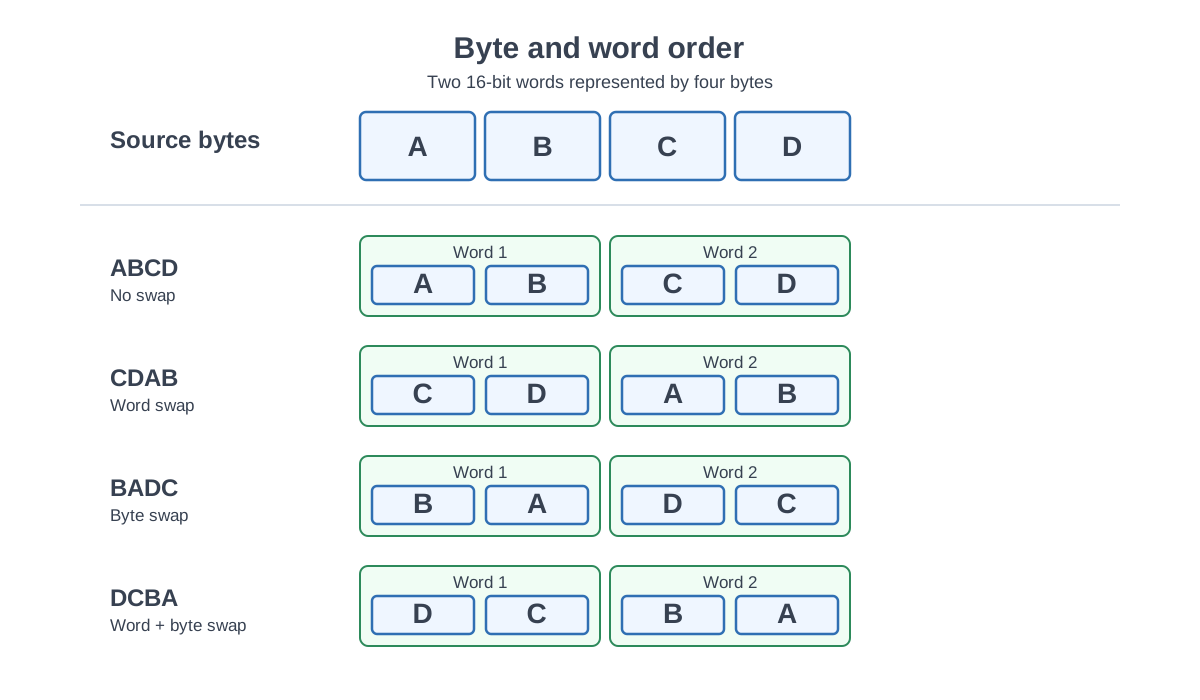
For a 32-bit value, it is common to label the four bytes A B C D. Two Modbus registers then contain two 16-bit words.
Different devices and clients may combine the words differently:
| Order | Byte sequence |
|---|---|
ABCD | A B C D |
CDAB | C D A B |
BADC | B A D C |
DCBA | D C B A |
The Modbus protocol defines byte ordering inside the protocol fields, but a manufacturer’s representation of multi-register application values still needs to be documented. Do not guess the word order from another product made by the same manufacturer.
If several arrangements produce believable numbers, change the physical condition or compare against a known reference. A value that happens to look realistic at one operating point can still be wrong.
Scaling, offset and engineering unit
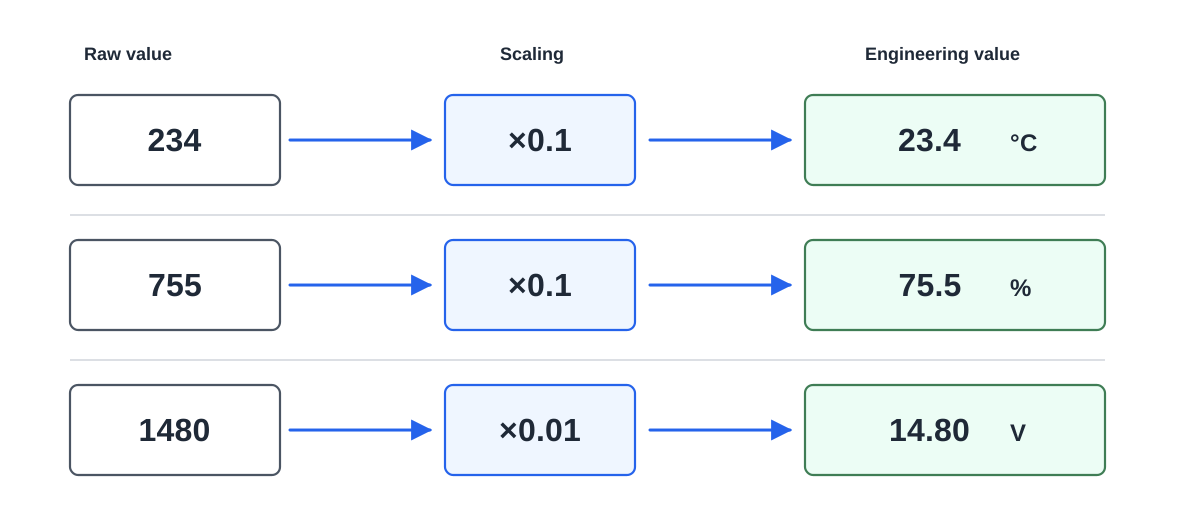
Many devices expose an integer representation rather than the final engineering value.
Example:
Raw = 234
Scale = x0.1
Value = 23.4 °C
Some interfaces also use an offset:
Engineering value = raw x scale + offset
The scale, offset and unit are separate properties. The unit cannot be inferred safely from the number alone.
Scaling and resolution are not the same thing
A subtle problem appears with writable values. A register may represent temperature in 0.1 °C counts while the real control algorithm accepts only 0.5 °C steps.
For example, the client may write raw value 198 for 19.8 °C. The device may normalize that to 20.0 °C and return raw value 200 when the register is read back. Both sides are behaving consistently with their own assumptions, but the interface becomes confusing if the real resolution and normalization policy are not documented.
For a read-only measurement, this distinction may be less visible. For a writable parameter it can lead to repeated writes if the PLC insists that the readback must exactly equal the original raw command.
Hidden dependencies can change the meaning of a correct value
Sometimes the register itself is decoded correctly but another setting changes its meaning. A global temperature-unit register is a common example. If one setting changes hundreds of Modbus values from Celsius to Fahrenheit, the BMS must know the selector state before it can safely interpret those values.
Machine-to-machine interfaces are usually easier to integrate when units stay stable. If a dependency is unavoidable, the register map should document it next to every affected value and define the factory default.
An undocumented default such as 0 in an enum that only documents values 1, 2 and 3 is still an interface defect even if the firmware team knows what zero means.
A reliable troubleshooting method
When the displayed value is wrong:
- Capture or decode the raw response.
- Confirm the function code and register address.
- Confirm how the manual numbers the registers.
- Confirm the data type and number of registers.
- Check signed versus unsigned interpretation.
- For multi-register values, verify word and byte order.
- Apply the documented scale and offset.
- Confirm the engineering unit.
- Check whether another register changes the interpretation.
- For writable values, verify the supported resolution, validation and readback behaviour.
Do not tune the conversion until the raw data path is understood. That prevents a configuration that accidentally compensates for the wrong register or wrong data type.
For the broader protocol context, see the Modbus RTU and TCP guide.