
868 MHz vs 2.4 GHz for Building Automation
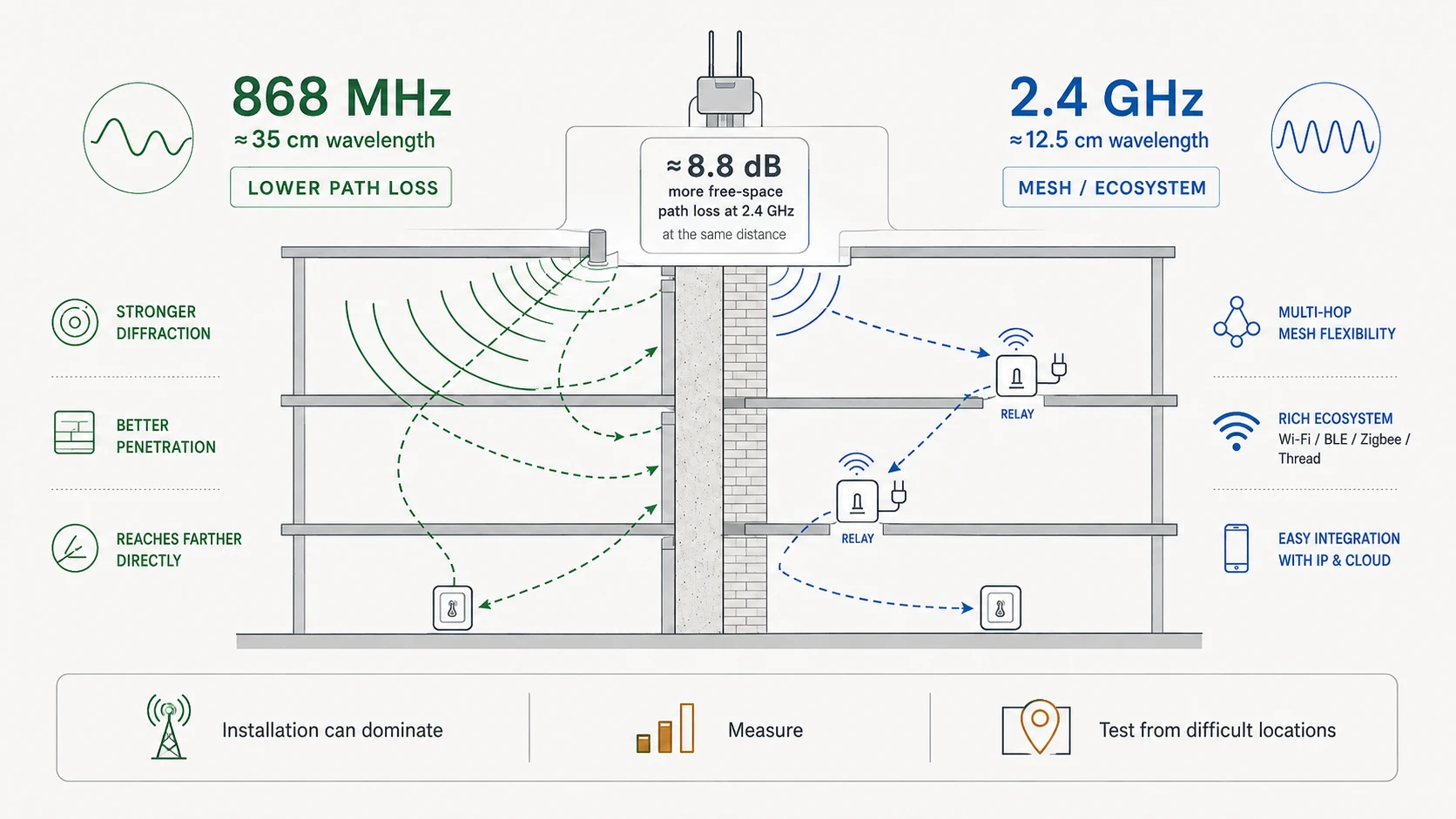
For wireless building automation, 868 MHz vs 2.4 GHz is mainly a trade-off between propagation and ecosystem. Sub-GHz radio usually gives better range and building penetration, while 2.4 GHz supports Wi-Fi, BLE, Zigbee and Thread.
For broader context, see the wireless building automation guide.
Why 868 MHz often reaches farther
The guide calculates about 8.8 dB more free-space path loss at 2.4 GHz than at 868 MHz at the same distance. Wavelength is also longer at 868 MHz, about 35 cm versus about 12.5 cm at 2.4 GHz, which generally helps diffraction around building-scale obstacles.
When 2.4 GHz is the better engineering choice
2.4 GHz is often the practical choice for smartphone commissioning, Wi-Fi integration and room-level Zigbee or Thread mesh. Mains-powered mesh routers can create multiple hops through the building, reducing the need for every battery device to reach one gateway directly.
What can reverse the expected result
A badly placed 868 MHz antenna can perform worse than a well-installed 2.4 GHz system. Metal cabinets, long coax, the wrong antenna band, poor orientation and local interference can dominate the link. Always validate RSSI, SNR and packet delivery in the real building.
Practical engineering check
Use the concept as part of a measured installation rather than as an isolated rule. Confirm the device and antenna are intended for the correct frequency region, inspect the final mounting position, and establish a baseline from the real endpoint location. Change one variable at a time so the effect of antenna position, height, metal, cable loss or nearby equipment remains visible in the results.
Record RSSI, SNR and packet delivery where the protocol exposes them. Repeat the test from the building’s difficult locations with doors closed and normal equipment running. If a small placement change creates a large improvement, solve the physical RF path before increasing transmit power or adding unnecessary hardware.
Common mistakes to avoid
- Treating a datasheet range as a guaranteed indoor distance.
- Testing only beside the gateway instead of from the worst-case room.
- Leaving an antenna inside or directly against a metal enclosure.
- Judging reliability from one RSSI value or one successful packet.
- Changing several variables at once and losing the ability to identify the real cause.